Every strategist, growth operator, or everyday market research analyst knows the mind-numbing exhaustion of manual desk research:
"To audit how ten competing software vendors changed their packaging heading into the new quarter, you find yourself juggling fifty browser tabs. On every single site, you swat away cookie banners. You manually drag seat-tier sliders back and forth. You click open hidden accordion FAQs, take screenshots of dynamic pricing tables, and copy-paste numbers into a spreadsheet for three straight hours."
According to enterprise productivity studies by Gartner, strategy teams spend nearly 40% to 50% of their billable hours on this mechanical grunt work—clicking buttons, navigating pagination, and transcribing web data.1
Traditional web scrapers (like Python scripts using BeautifulSoup or Scrapy) break down constantly on modern websites. The moment a site uses single-page applications (SPAs), interactive JavaScript graphs, or requires a mouse hover to open a menu, legacy scripts choke and throw errors.
That is why a recent open-source project called browser-use/browser-use exploded across the developer community, rocketing past 118,000 GitHub stars.2
Instead of parsing fragile HTML source code, Browser-Use gives AI models the ability to look at a browser screen, click buttons, drag sliders, and navigate pages just like an intern sitting at your desk.
Here is a practical look at how autonomous browser agents work, where they give market research teams a distinct speed advantage, and the real-world engineering constraints you need to know.
1. The Big Shift: From Fragile Code Scraping to Visual Action Loops
Why did old scraping tools break so easily, and why can an autonomous browser agent execute thorough competitor research and consumer research across dynamic web portals? The breakthrough comes down to a fundamentally different engineering paradigm:
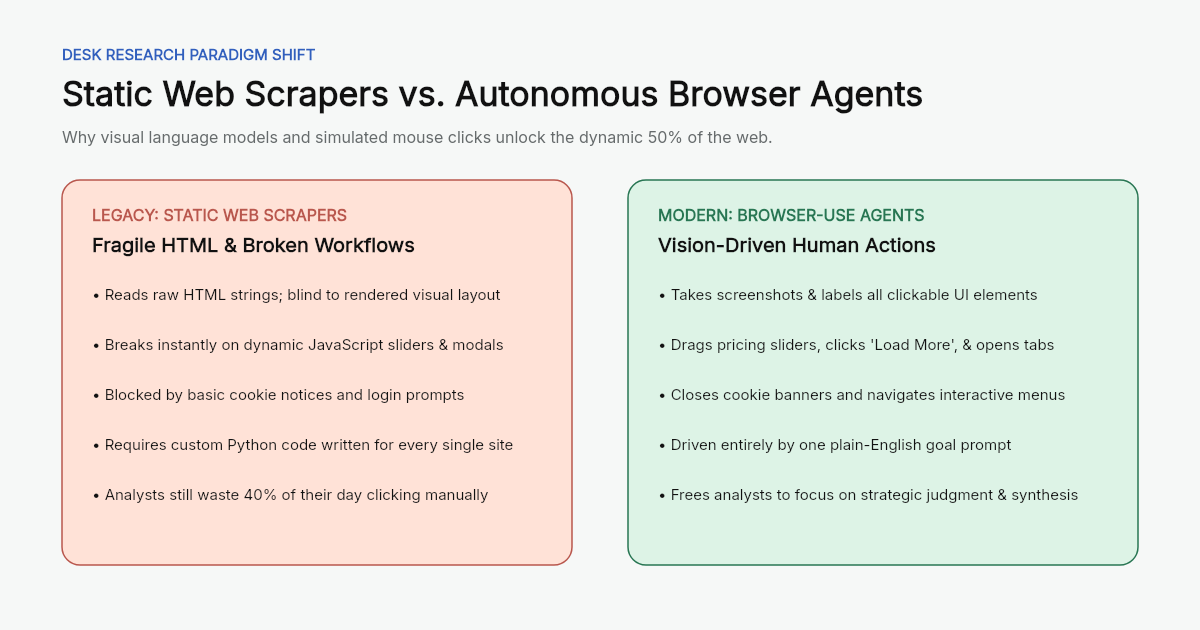 Figure 1: How vision-language models and simulated mouse actions unlock the dynamic 50% of the web that broke traditional scrapers.
1. Labeling the Interactive Tree
When Browser-Use opens a competitor's website, it does not just read text strings. It takes a visual snapshot of the rendered screen and overlays small numbered badges on every clickable element:
[24] Button: Switch to Annual Billing[38] Slider: Select Number of Team Seats[52] Accordion: View Enterprise Feature Comparison
2. Reasoning and Taking Physical Actions
A multimodal vision model looks at that annotated screenshot, understands the layout, and issues a sequence of human-like browser actions:
"I need to click 24 to see annual discount pricing, drag slider 38 to 50 seats, and extract the resulting dollar figure."
This visual feedback loop—screenshot the page ➔ label elements ➔ decide the next step ➔ simulate mouse click or keystroke ➔ inspect the new state—allows agents to interact with dynamic web pages that previously required human hands.
3 Practical Ways Research Teams Put Browser Agents to Work
When a modern team or an agency delivering market research services plugs autonomous browser agents into their competitive intelligence workflow, manual tasks that used to burn an entire afternoon collapse into a single plain-English prompt:
Use Case 1: Auditing Dynamic SaaS Pricing Calculators
- The Headache: Most modern B2B vendors no longer publish a single flat pricing table. They use interactive sliders based on seat count or usage tiers.
- The Agent Prompt:
"Visit the pricing pages of these five competitors. Dismiss all cookie banners. Move the seat slider to 10, 50, and 250 users. Record the monthly quote for each tier, and compile the results into a clean comparison spreadsheet."
- What Happens: The agent opens the browser, drags the sliders, captures the live calculated rates, and returns clean structured data.
Use Case 2: Tracking Competitor Product Changelogs Over Time
- The Headache: Product release notes often span dozens of pages. Researchers have to click "Load More" repeatedly to see what features were quietly deprecated six months ago.
- The Agent Prompt:
"Navigate to Competitor X's changelog. Scroll down and repeatedly click the 'Load Older Updates' button until you reach May 2026. Summarize which major features were launched, modified, or discontinued."
Use Case 3: Extracting Deep Directory Profiles from Industry Summits
- The Headache: Event sponsor lists often require clicking individual company tiles to open a pop-up modal containing executive names and service descriptions.
- The Agent Prompt:
"Browse the official exhibitor directory for the annual retail summit. Click into the first 40 sponsor profiles, open their detail pop-ups, and extract the company name, founder contact, and primary focus area."
3 Reality Checks: Engineering Constraints to Keep in Mind
As exciting as autonomous browsing is, experienced teams know that deploying agents in production comes with three practical trade-offs:
1. Visual Token Consumption and API Costs
Every time the agent takes a screenshot and inspects page elements, it feeds high-resolution images to a vision-language model. An extensive 20-step investigation across multiple tabs can easily consume 50 to 100 screenshots, costing $1 to $3 per run. Setting strict step limits prevents agents from wandering off into rabbit holes.
2. Bot Detection and Anti-Automation Walls
High-value commercial directories (such as LinkedIn, G2, or specialized financial portals) deploy aggressive bot mitigation systems like Cloudflare Turnstile or CAPTCHAs. Open-source local agents require residential proxy rotation or stealth browser runtimes to avoid getting blocked.
3. Verification Still Matters
While an agent can open tabs and record numbers, it can still misinterpret ambiguous text—such as mistaking an annual total for a monthly rate. Critical commercial decisions still need human review, supported by screenshot evidence.
The Takeaway: Freeing Human Analysts for Real Strategy
The massive momentum behind browser-use—surpassing 118,000 GitHub stars—highlights an undeniable truth: knowledge workers want to spend less time clicking buttons and more time thinking.
Whether working inside enterprise teams or specialized market research companies, an analyst's worth in modern marketing research was never about how fast they could copy-paste numbers from twenty websites into Excel.
The future belongs to teams that delegate tedious web navigation to autonomous browser agents, leaving human researchers free to analyze findings, test commercial hypotheses, and guide leadership decisions with speed and clarity.
Sources and date notes
Notice and fair use statement: Open-source project metrics, architectural diagrams, and user workflow illustrations referenced in this guide are derived from public GitHub repositories and practitioner discussions under open-source licenses. Trademarks and brand names belong to their respective corporate entities.
Disclaimer
This review is intended for software architecture evaluation, market research automation methodology, and workflow planning only. Organizations should ensure automated browsing activities comply with target website Terms of Service and data protection regulations.
CTA
Looking to replace manual desk research with verifiable, multi-source intelligence? Discover how ResearchMaster AI structures complex web evidence into decision-ready strategic reports.
Footnotes
- Gartner Enterprise Research, Analyst Productivity Benchmarks in Strategic Market Intelligence and Desk Research, accessed October 2026. ↩
- GitHub Official Repository,
browser-use/browser-use: Open-source Python library for AI browser agents, 118,000+ Stars, accessed October 2026. ↩