On November 17, Instagram introduced a new creator tool called Content Protection in an official Creators announcement. The short version: if your original Reels keep getting copied, Instagram can scan for matching uploads and let you decide what happens next.
Instagram's own announcement says that, once eligible creators enroll, Content Protection automatically looks for visual matches of their original videos across Instagram and Facebook. When the system finds a match, it sends an alert and gives the creator a choice about what to do next.
The announcement matters because creators have complained about this exact problem for years. Someone takes your Reel, strips the credit, reposts it as their own, and the original often performs worse than the copy.
Below is the practical version, based first on Instagram's announcement and then cross-checked against independent reporting. It is a 30-minute rights audit you can run before enrolling your catalog.
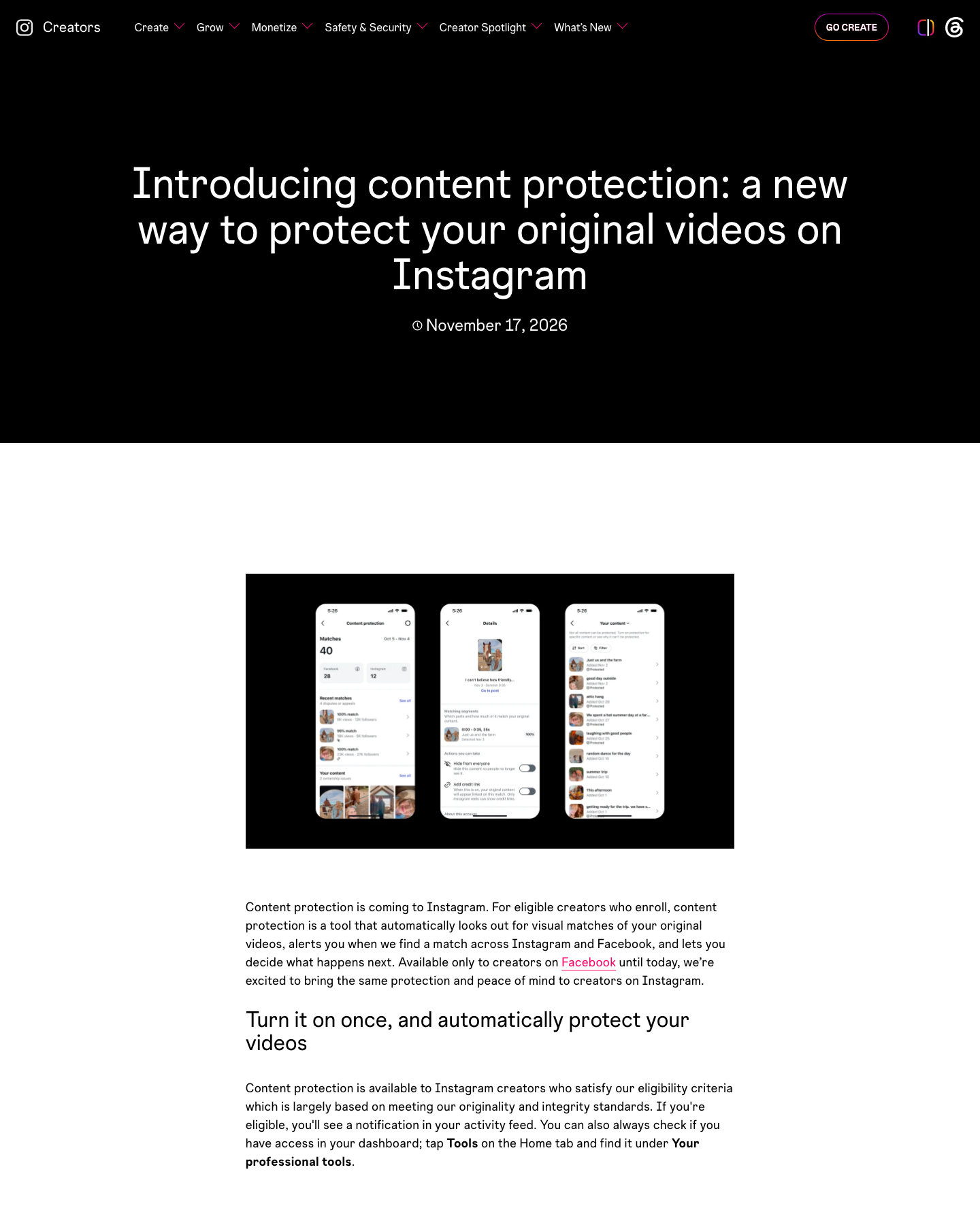
Source: Instagram Creators, “Introducing content protection”, accessed November 19, 2026. Screenshot shown for reporting and source verification.
The official page shows the matching queue, a match-detail view, and the dashboard path for the tool. It is not a full copyright system. It is a platform-level matching and action tool.
What Instagram says the tool does
According to TechCrunch, Content Protection continuously scans Instagram for unauthorized uses of protected videos. When a match is found for one of your Reels, Instagram sends you an alert.
After that, you have four choices:
- Track the copied Reel. This is the default option.
- Hide from everyone on Instagram and Facebook.
- Add credit link, which places an “original by” label linking viewers back to your original video.
- Release the match, removing your claim and letting the copied video remain visible.
Tubefilter’s report confirms those four actions and adds an important limitation: Instagram creators cannot receive monetization from unauthorized reposts in the way YouTube creators sometimes can through Content ID.
So this is not “you get paid when someone steals your video.” It is detection plus a set of actions.
Who can use it?
Instagram says creators need a professional Instagram account and must meet its eligibility criteria, which are largely based on its originality and integrity standards. Eligible creators will see a notification in their Activity feed or can look for the feature in the Professional Dashboard.
Once you enroll, new original videos you publish should automatically enter protection. You can also manually select eligible videos you already posted.
Instagram also lets creators add approved accounts to an allow list. TechCrunch gives a practical example: your second account, collaborators, or a brand that has permission to use your videos can be added so they do not get flagged as matches.
The 30-minute rights audit
Before you enroll your entire catalog, spend 30 minutes deciding which Reels actually belong in the protected set.
Minutes 1 to 10: List your highest-value original Reels
Open your Reels tab and create a quick list. Prioritize videos that meet one or more of these conditions:
- They bring you leads, sales, clients, or newsletter signups.
- They explain a method, process, or point of view you own.
- They have been copied before.
- They contain your face, voice, or original script.
- They are central to how people recognize your account.
Do not start with every upload. Some Reels were experiments. Some reuse licensed music, client footage, or UGC you do not control. Those can create more problems than they solve.
Minutes 11 to 15: Check ownership and permissions
For each video, ask three questions:
- Did I create the script, footage, or edit?
- Do I have permission for every major asset?
- If someone else helped produce it, do I have the right to enforce protection?
This matters for:
- Client deliverables.
- Brand collaborations.
- Freelance editors.
- Licensed music.
- Product demos using customer assets.
- Team members who filmed the original footage.
If a video belongs to a client, ask before adding it. If a brand paid for the asset, check the contract. If your editor supplied b-roll, make sure you have a license.
Content Protection is strongest when you enforce rights you actually hold.
Minutes 16 to 20: Add your allow list
Think about accounts that legitimately repost or reuse your videos.
These might include:
- Your main brand account.
- A personal account.
- A regional account.
- An editor or agency.
- A collaborator who co-created the Reel.
- A brand partner running an approved campaign.
Add them before matches start appearing. Otherwise, your own authorized team may show up as a match and waste your time.
Minutes 21 to 25: Set your match policy
Do not hide every match immediately. A copied video can mean different things depending on context.
Use this simple decision table:
| Situation | Starting action |
|---|---|
| Full copy used for ads, paid promotion, or direct monetization | Hide from everyone |
| Copy strips your name and pretends to be original | Hide from everyone, then monitor |
| News account or aggregator quotes your Reel | Add credit link |
| Collaborator or licensed account was flagged | Release the match |
| Unclear whether the copy is harmful | Track |
The important point is to decide before you are annoyed. When you see your content stolen, it is easy to overreact and hide something that was actually fair commentary or licensed use.
Minutes 26 to 30: Create a simple match log
Create a sheet with these columns:
| Field | Why it matters |
|---|---|
| Original Reel URL | Links the match back to your source |
| Matched Reel URL | Makes follow-up possible |
| Matched account | Shows whether the same account repeats |
| Date found | Helps you spot recent clusters |
| Views | Gives context, though views alone are not proof of harm |
| Follower count | Shows the size of the account that posted the match |
| Action taken | Track, hide, credit, or release |
| Notes | Licenses, collaborators, screenshots, or disputes |
TechCrunch reports that alerts include details about the matching video, including its view count and the follower count of the account that posted it. That information is useful, but it is not a verdict. A small account with one stolen Reel may still be a problem. A large account may have a legitimate license.
What about AI-adapted copies?
This is the part many creators will care about.
TechCrunch reports that Instagram will begin detecting AI-generated videos that reuse audio from creators’ original content, even when the visuals have been altered. The company plans to test this with a small group of creators first, then expand access to creators enrolled in Content Protection on both Instagram and Facebook.
In plain terms: Instagram knows that copying is not always a frame-for-frame repost anymore. Someone can replace the visuals with AI footage while keeping your voice, hook, or explanation.
That is harder to catch than a straight upload.
Instagram is also exploring ways to limit the reach of accounts that repeatedly use AI tools to repost other people’s work, according to TechCrunch.
For now, treat AI-copy detection as a test, not a guarantee.
A match appeared. Now what?
Use this order:
1. Check the context
Ask:
- Is this a full copy?
- Did they credit me?
- Are they monetizing it?
- Is it commentary, parody, education, or aggregation?
- Is the account a known partner?
2. Start with Track unless the copy is clearly harmful
Track keeps the matched Reel visible while you monitor it. Tubefilter says this is the default option and creators can change the decision later.
Tracking is useful when:
- You are not sure whether you own every asset.
- The match is commentary rather than a straight copy.
- You want to see how far the copied version travels.
- You need evidence before escalating.
3. Use Add credit link for useful attribution cases
If a media page, aggregator, or creator reposts your Reel but the content still makes sense, a credit link may be better than a takedown. TechCrunch says the “original by” label links viewers back to the original creator’s video or profile.
This can be a good outcome when:
- The repost is clearly based on your video.
- Your username or brand is missing.
- The copy is getting attention you cannot recover.
- You want discovery more than removal.
4. Use Hide from everyone for direct harm
Hide the match when:
- It is a full copy.
- It removes your branding.
- It is used in ads or paid promotion.
- It redirects viewers to a scam, clone, or impersonation.
- It damages your client relationship or brand safety.
TechCrunch says hiding the matched content blocks it from being viewed on both Instagram and Facebook.
5. Release only when you have a reason
Release removes your claim and leaves the matching video available. Use this for:
- Licensed collaborators.
- Approved brand campaigns.
- UGC you allowed.
- False positives caused by common templates or public-domain footage.
Do not release a match just because the other account claims innocence. Check the license first.
Three mistakes to avoid
1. Enrolling videos you do not fully control
If a Reel contains client footage, licensed music, partner assets, or UGC, ask before enrolling it. You may have publishing rights but not enforcement rights.
2. Treating every match as theft
A match can be:
- theft.
- commentary.
- aggregation.
- licensed reuse.
- an approved campaign.
- a false positive.
Track it, check the context, and then decide.
3. Ignoring the audit trail
Platform features change. Accounts get renamed. Links disappear. Your match log is what turns scattered alerts into evidence.
If you need to escalate to Meta, a client, or legal counsel later, you will want the original URL, matched URL, dates, screenshots, and the action you took.
Should you use Content Protection right now?
Yes, if:
- You publish original Reels regularly.
- Your Reels generate leads or revenue.
- Your account is part of your business.
- You have been copied before.
- You collaborate with multiple accounts and need an allow list.
Wait, if:
- Most of your videos depend on third-party assets.
- You do not have source files or ownership documentation.
- You are mid-contract with a client and unclear who owns enforcement rights.
- You plan to use licensed music or UGC without checking permissions.
The feature is useful, but only when the underlying rights are clean.
Sources and date notes
- Instagram Creators, Introducing content protection: a new way to protect your original videos on Instagram, published November 17, 2026. This official announcement explains visual matching, eligibility, Activity feed notifications, and the Professional Dashboard entry point.
- TechCrunch, Instagram’s new tool for creators targets unauthorized reposts and AI-modified videos, published November 17, 2026. This article explains matching actions, retroactive protection, allow lists, and the upcoming spoken-word matching test.
- Tubefilter, Sick of pirates and freebooters? Meta brings its “content protection” tool to Instagram., published November 17, 2026. This article describes fingerprinting, eligible creators, the four match actions, and the lack of monetization from unauthorized reposts.
- Meta for Creators, Rights Manager, accessed November 18, 2026. This page describes Rights Manager’s coverage across Facebook and Instagram, match surfaces, action controls, insights, and access requirements. The official screenshot is used for commentary and source verification. Feature availability, eligibility rules, and AI-copy detection may change as Instagram continues rolling out Content Protection. This article reflects public reporting available in November 2026.
Disclaimer
This article is for creator workflow education only. It is not legal advice. Before filing copyright claims or enforcing rights against another account, review Instagram’s current policies, your content licenses, and applicable local rules.
CTA
Want to see which competitors are copying your video structure, product claims, or audience hooks? Try ResearchMaster AI to turn scattered public content signals into a source-backed research brief.